 English







360 Degree Feedback
Enable Matrix-View of survey statements for Survey Participants
February 11, 2026
| Learning & Development
We can now choose to have a matrix view enabled for showing survey statements to survey participants. Using this, they can see multiple questions in a single view, and select the answer options with minimal scroll across the page.
The “Enable Matrix View for this Section” setting in the survey's assessment allows survey creators to present all survey statements of a section on a single screen, arranged in a matrix/grid-style layout. This view helps candidates see all statements and their response options together, making it easier and faster to answer MCQs that share similar options or rating scales.
When enabled, the section appears in a table-like (matrix/grid) format, allowing candidates to view, compare, and respond to multiple questions at once — improving both speed and consistency.
Below is how the UI appears to survey participants on enabling it:
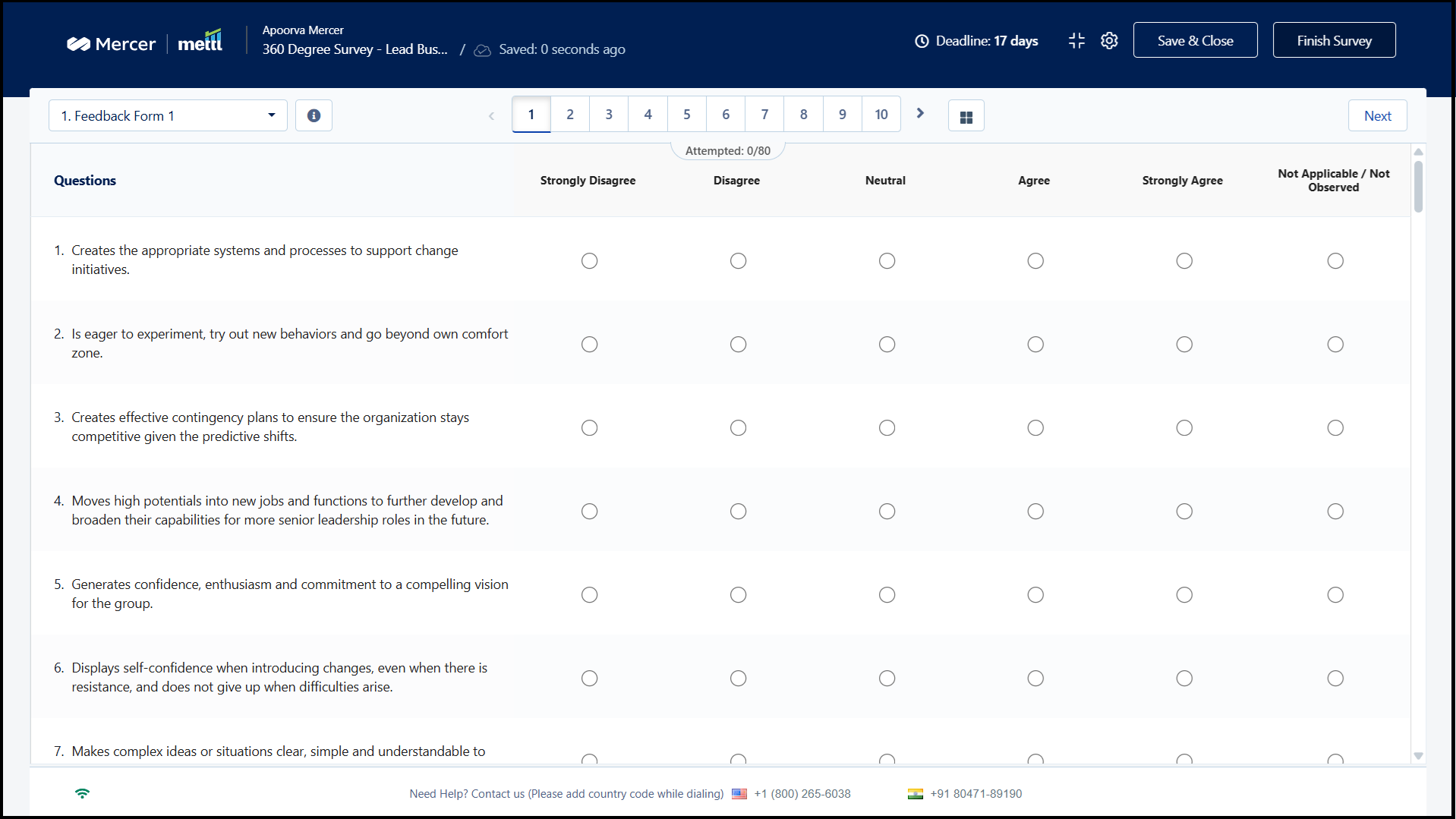 Questions that have same answer options are very well suited for this kind of view. Matrix View simplifies this by presenting:
✔ All section questions on a single page
✔ Answer options aligned side-by-side in a grid
✔ A table-like view that is easier to scan and compare
How It Improves Candidate Experience:
• See everything at once — Reduces navigation effort and scrolling
• Answer faster — Side-by-side options speed up decision-making
• Maintain response consistency — Prevents contradictory responses
• Compare questions easily — Ideal for rating, evaluation, and attitude-based sections
By reducing clicks and cognitive load, Matrix View ensures a smoother, distraction-free test experience.
Stay tuned for more amazing updates coming your way!
Questions that have same answer options are very well suited for this kind of view. Matrix View simplifies this by presenting:
✔ All section questions on a single page
✔ Answer options aligned side-by-side in a grid
✔ A table-like view that is easier to scan and compare
How It Improves Candidate Experience:
• See everything at once — Reduces navigation effort and scrolling
• Answer faster — Side-by-side options speed up decision-making
• Maintain response consistency — Prevents contradictory responses
• Compare questions easily — Ideal for rating, evaluation, and attitude-based sections
By reducing clicks and cognitive load, Matrix View ensures a smoother, distraction-free test experience.
Stay tuned for more amazing updates coming your way!
Questions that have same answer options are very well suited for this kind of view. Matrix View simplifies this by presenting:
✔ All section questions on a single page
✔ Answer options aligned side-by-side in a grid
✔ A table-like view that is easier to scan and compare
How It Improves Candidate Experience:
• See everything at once — Reduces navigation effort and scrolling
• Answer faster — Side-by-side options speed up decision-making
• Maintain response consistency — Prevents contradictory responses
• Compare questions easily — Ideal for rating, evaluation, and attitude-based sections
By reducing clicks and cognitive load, Matrix View ensures a smoother, distraction-free test experience.
Stay tuned for more amazing updates coming your way!Get awesome marketing content related to Hiring & L&D in your inbox each week
Stay up-to-date with the latest marketing, sales, and service tips and news
By using our offerings and services, you are agreeing to the Terms of Services and License Agreement and understand that your use and access will be subject to the terms and conditions and Privacy Notice