English

Logo
X

Get awesome marketing content related to Hiring & L&D in your inbox each week

Stay up-to-date with the latest marketing, sales, and service tips and news
Test taker

Matrix-View for candidate

February 11, 2026
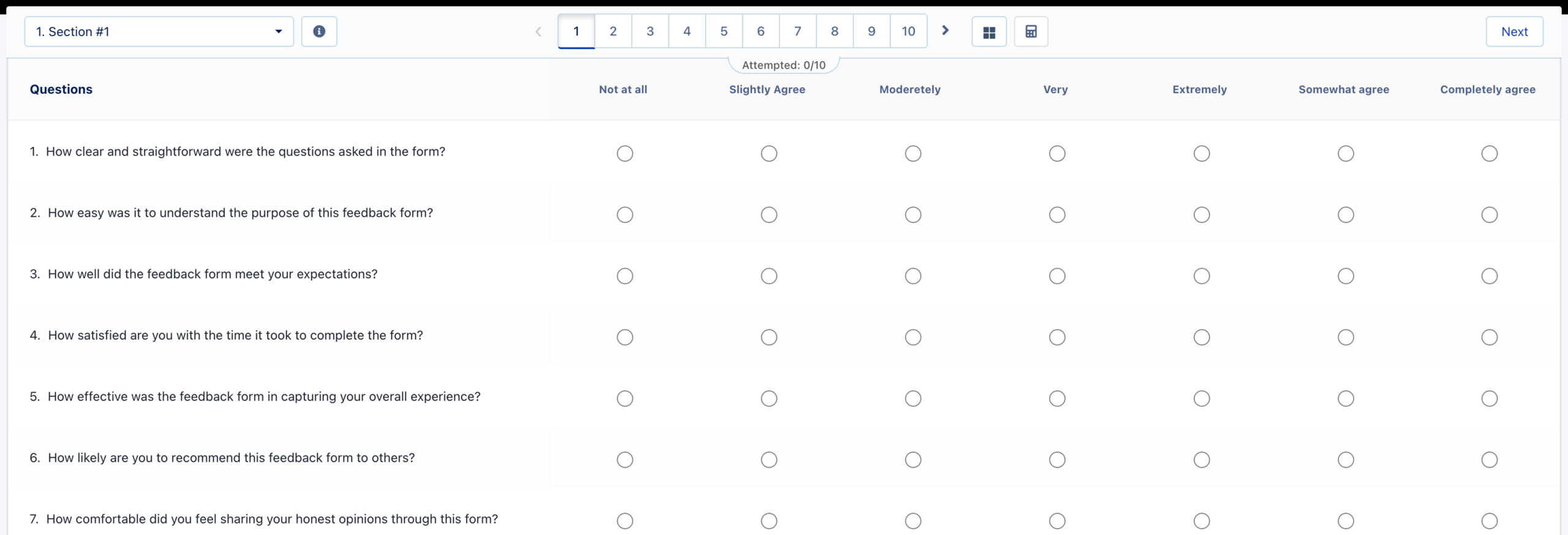
The “Matrix View” allows test creators to present all questions of a section on a single screen, arranged in a matrix/grid-style layout. This view helps candidates see all questions and their response options together, making it easier and faster to answer MCQs that share similar options or rating scales.
When enabled, the section appears in a table-like (matrix/grid) format, allowing candidates to view, compare, and respond to multiple questions at once — improving both speed and consistency.


Why Matrix View?

In standard test layouts, candidates either:
• View one question per page, or
• See multiple questions vertically in a scrolling list
While useful, these formats can be slow for sections where all questions have similar answer options.
Matrix View simplifies this by presenting:
✔ All section questions on a single page
✔ Answer options aligned side-by-side in a grid
✔ A table-like view that is easier to scan and compare
This format is particularly useful for:
• Likert scale surveys (e.g., Strongly Agree → Strongly Disagree)
• Feedback forms
• Personality assessments
• Opinion-based and rating questionnaires
• Rapid-response MCQs

How It Improves Candidate Experience

Benefits — Why It Matters
• See everything at once — Reduces navigation effort and scrolling
• Answer faster — Side-by-side options speed up decision-making
• Maintain response consistency — Prevents contradictory responses
• Compare questions easily — Ideal for rating, evaluation, and attitude-based sections
By reducing clicks and cognitive load, Matrix View ensures a smoother, distraction-free test experience.

How Test Creators Can Use It

1. Go to the Test Creation screen.
2. Open the settings of the desired section.
3. Enable the “Enable Matrix View for this Section” option.
4. Save the section.
When enabled, all questions in that section will appear together in a matrix/grid layout during the test.

Matrix View vs. Multiple Questions Per Page

Feature: Show Multiple Questions Per Page — Matrix View
Layout: Multiple questions vertically — All questions in a matrix/grid
Navigation: Scroll to view questions — No scrolling; all in one view
Best For: Standard MCQs — Rating scales, comparison questions
Matrix View is not simply “multiple questions on one page” — it is a structured grid designed for quick comparison and consistent answering.

When Should You Enable Matrix View?

Enable Matrix View when:
• All questions have  the same answer options
• You want candidates to answer faster
• You want to reduce navigation
• You want a rating-scale or survey-style layout
Avoid using Matrix View when:
• Questions have different answer types
• Questions contain long text or rich media

Final Thoughts

Matrix View significantly improves test-taking efficiency, supports clear comparison across questions, and provides a user-friendly experience ideal for rating-based sections. Using this setting thoughtfully allows test creators to design assessments that are more modern, intuitive, and candidate-friendly.

Stay up to date with the latest features and skills on Mercer I Mettl

Stay up to date with the latest features and skills on Mercer I Mettl