 English







A guide to exam proctoring and how it works
Summary
Exam proctoring helps keep assessments secure, consistent, and credible by adding supervision and clear rules. This blog covers what proctoring means, why it’s used, the main types of proctoring, and how the process typically works from pre-exam verification through exam completion.
Introduction
Exam proctoring helps keep assessments secure, consistent, and credible by adding supervision and clear rules. This blog covers what proctoring means, why it’s used, the main types of proctoring, and how the process typically works from pre-exam verification through exam completion.
Proctoring helps strengthen this assurance by introducing structured oversight before and during the session, as well as a defined process for reviewing potential irregularities.
At the same time, proctoring shapes the candidate experience through check-in requirements, environment expectations, and limits on permitted resources. A clear understanding of its purpose and process reduces uncertainty, supports smoother exam delivery, and helps set consistent expectations for all parties involved.
What is exam proctoring?
Exam proctoring is the process of supervising an exam to ensure it is completed securely and according to established rules. The purpose is to confirm that the correct candidate is taking the test, that exam conditions are consistent for everyone, and that the final score reflects the candidate’s own knowledge and skills.
Traditionally, proctoring happens in person, with an invigilator monitoring candidates in an exam hall. However, as online and remote assessments have grown, proctoring has expanded to include multiple digital methods. This includes identity verification, webcam and microphone monitoring, screen monitoring, secure browsers, and recorded session reviews.
Overall, proctoring helps maintain the integrity and credibility of assessments, whether they’re academic exams, professional certifications, or corporate evaluations.
Why is proctoring used in modern exam delivery?
Proctored exams help make assessments impartial, secure, and dependable, especially when they’re delivered online or across multiple locations. They also give institutions and employers confidence that scores reflect real performance.
Protect exam integrity
Proctoring reduces cheating by setting clear boundaries during the test. This helps ensure scores reflect what the candidate knows. It also closes common loopholes, such as using unauthorized notes, getting help from someone off-camera, or switching between apps and websites.
Confirm the test-taker’s identity
Identity checks verify the right person is taking the exam. That lowers the risk of impersonation and strengthens confidence in results. Depending on the exam, this may include ID verification, face matching, and basic authentication steps before the test begins.
Keep testing conditions consistent
Proctoring helps create similar conditions for all candidates, regardless of location. This makes the assessment comparable. For example, standardized rules around time, allowed materials, and environment checks help reduce advantages gained through different setups.
Support high-stakes decisions
Many institutions or organizations use proctoring when results impact admissions, certification, or hiring. It adds credibility when outcomes really matter. When decisions are based on scores, proctoring helps ensure the process is defensible and trusted by stakeholders.
Enable secure remote testing
Proctoring allows candidates to take test from home while still being supervised. This improves flexibility without losing control over candidates' activities. It can combine webcam monitoring, screen tracking, and secure browsers to recreate key safeguards of an in-person exam.
Meet policy and compliance expectations
Proctoring helps align exams with institutional rules and required standards. It also makes the process easier to defend during audits or reviews. Clear procedures and documented monitoring help show that the assessment followed defined governance and testing policies.
Document sessions for review
Proctoring can capture logs, flags, or recordings when needed. This helps resolve disputes and handle appeals better. If an issue arises, reviewers can check time-stamped evidence rather than relying solely on assumptions or complaints.
Types of proctoring used to supervise exams
Not every exam needs the same level of supervision, so proctoring is usually selected based on the exam’s risk level, format, and the number of candidates. Here are the most common types, including options used for both in-person and remote assessments.
In-person proctoring
Candidates take the exam at a test center or classroom while an invigilator supervises. This offers strong control over the environment, allowed materials, and candidate behavior.
Remote proctoring
According to Business Research Insights, the global remote proctoring solutions market size was valued at USD 0.58 billion in 2026 and is projected to reach USD 2.44 billion by 2035 during the forecast period.
Candidates take the exam from home or another location while being monitored using technology such as a webcam, microphone, screen monitoring, and/or a secure browser. Remote proctoring is widely used for online learning, certifications, and corporate assessments because it balances flexibility with oversight.
Live online proctoring
A real proctor monitors the candidate in real time via webcam and screen sharing. If something looks suspicious, the proctor can issue a warning, pause the session, or escalate the case immediately.
Recorded proctoring
The candidate’s session is recorded (video/audio/screen) and reviewed after the exam is submitted. This works well when live monitoring is difficult, but exam owners still need evidence for audits or investigations.
Automated proctoring
AI proctoring software tracks signals like extra faces in the frame, unusual movements, background noise, or frequent tab switching, and flags potential issues. Most programs pair AI flagging with human review to avoid partial decisions based on false positives.
Secure browser / lockdown proctoring
A secure browser limits actions like opening other tabs, copy-paste, screen capture, or switching applications. It is often combined with webcam monitoring, since device restrictions alone may not prevent off-screen cheating.
Hybrid proctoring
Many exams combine two or more methods (for example, secure browser and recorded monitoring) to ensure improved security without impacting the candidate experience. Hybrid models are especially useful for high-volume exams that still need strong control.
Exam proctoring workflow: From check-in to submission
Proctoring rules can differ, but the exam process usually follows the same core steps from check-in to submission. The process focuses on verifying the candidate's identity, securing the test environment, and monitoring the session so results remain reliable.
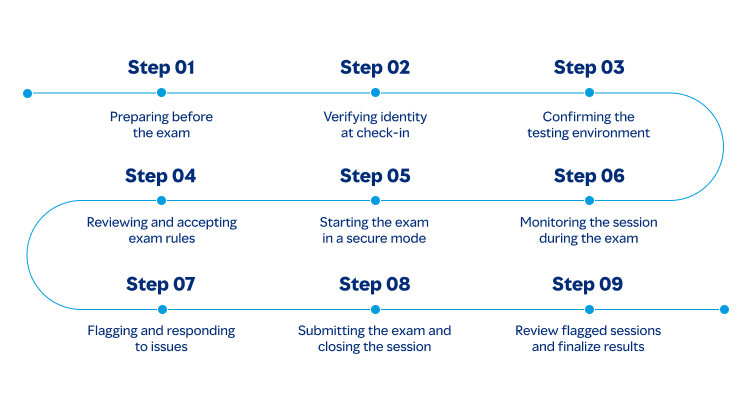
Step 1: Preparing before the exam
Candidates review instructions, check system requirements, and make sure their device, webcam, microphone, and internet connection are working properly. In some cases, they may also need to install a secure browser or complete a quick compatibility test.
Step 2: Verifying identity at check-in
The system or proctor confirms the candidate is the right person using verification options like an ID check, photo capture, face verification, or OTP-based login. This helps prevent impersonation and protects the credibility of the exam.
Step 3: Confirming the testing environment
At the test center, the room is already controlled; for remote exams, candidates may be asked to show their desk and surroundings on camera. This step helps ensure there are no unauthorized notes, devices, or other people present.
Step 4: Reviewing and accepting exam rules
Before the timer starts, candidates typically acknowledge the exam policies, what materials are allowed, what actions are restricted, and what counts as a violation. Clear rules at the start reduce confusion and set expectations.
Step 5: Starting the exam in a secure mode
The exam launches through an approved platform, often with restrictions that limit tab switching, copy/paste, screenshots, or access to other applications. These controls help keep the candidate’s attention within the exam environment.
Step 6: Monitoring the session during the exam
Monitoring may be handled by a live proctor, recorded for later review, or supported by automated tools that flag unusual activity. Depending on the setup, the system may track webcam video, audio, and screen or browser behavior.
Step 7: Flagging and responding to issues
If an issue is detected, such as leaving the camera frame, background voices, or repeated attempts to switch windows, the system may log the event or issue a warning. In live proctoring, the proctor can intervene immediately; in recorded setups, the incident is reviewed later.
Step 8: Submitting the exam and closing the session
After answers are submitted, the exam ends, and the proctoring session closes. If recording is enabled, the video, screen capture, and activity logs are saved as part of the exam record.
Step 9: Review flagged sessions and finalize results
If the session is flagged, reviewers may evaluate the evidence before confirming the outcome. Many providers include a human review step to reduce false positives and ensure decisions are impartial and consistent.
Conclusion
Exam proctoring supports impartial and reliable assessments by providing oversight and enforcing standardized rules during an exam session. It focuses on verifying identity, discouraging unauthorized assistance, and maintaining controlled testing conditions. Clear requirements, proportionate monitoring, and consistent review practices help reduce uncertainty and protect the credibility of results. As assessment delivery continues to evolve across different formats and locations, exam proctoring remains a key mechanism for maintaining integrity and ensuring outcomes can be trusted.
FAQs
Are proctored exams always recorded?
What do remote proctored exams typically require?
What happens if the proctoring software flags suspicious activity?


Online remote proctoring is the technology through which exams are conducted online in a cheating-free manner, using high-speed internet and a computer with a webcam. Online remote proctoring uses video streaming and AI or human proctors to invigilate large-scale exams securely.
 Online Examination
 Online Assessment
Related Products

Get awesome marketing content related to Hiring & L&D in your inbox each week
Stay up-to-date with the latest marketing, sales, and service tips and news
By using our offerings and services, you are agreeing to the Terms of Services and License Agreement and understand that your use and access will be subject to the terms and conditions and Privacy Notice